
Пополнение Steam Россия
⚡Steam Wallet Top-up for RF & CIS Accounts via Login — Rubles, no password required, no region change. Payment via SBP or MIR card; funds credited within 1–15 minutes.
❓What is Steam Wallet Top-up
Steam is Valve’s largest gaming platform, where users purchase games, DLCs and in-game items. Steam Wallet Top-up adds Russian Rubles to your account balance. You can use these funds for any purchases in the Steam Store without a bank card at checkout.
❓How to Top up your Steam Wallet
Find your Steam Login (Account Name — see section below).
Enter your Login and select the top-up amount in Rubles.
Choose your payment method: SBP or MIR card.
Complete payment — funds will be credited to your Steam Wallet within 1–15 minutes.
How to find your Steam Login for Top-up
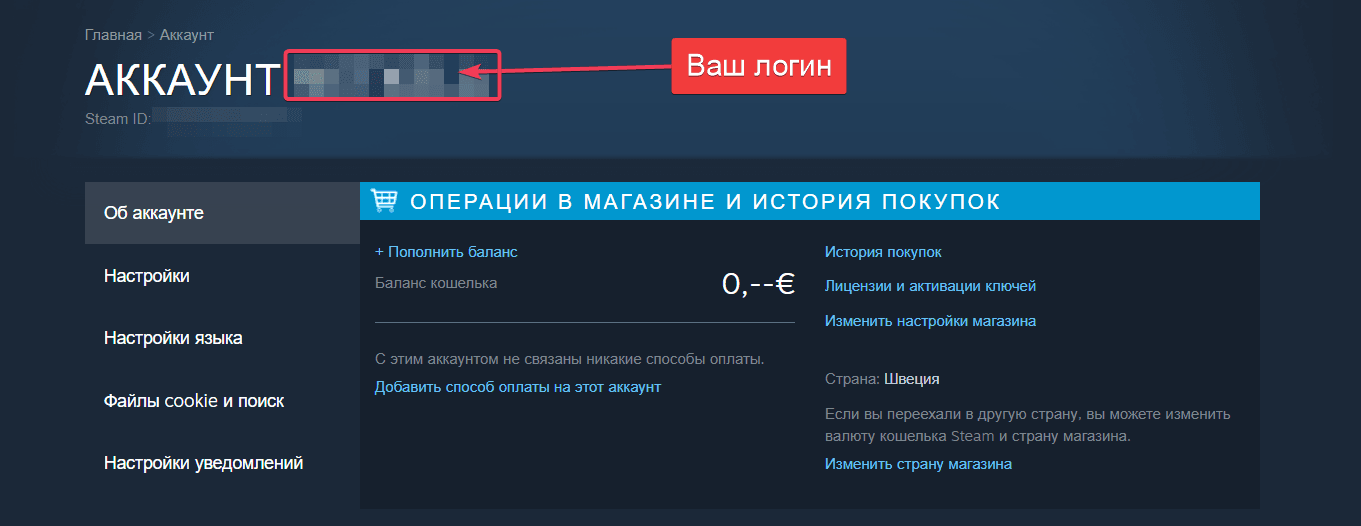
Your Login (Account Name) is what you enter to log into Steam.
It is not your profile nickname, email address or SteamID.
Sending funds to a nickname instead of your Login may result in the balance being sent to the wrong account, please check carefully.
Open the Steam desktop client (or shturl.cc in your browser).
Click your nickname in the top-right corner.
Select Account Details from the drop-down menu.
At the top of the page, your Login is displayed next to “User Account” — copy it.
Delivery & Payment
Most orders are credited to the Steam Wallet within 1–15 minutes (usually 1–5 minutes).
Payment is accepted via SBP instant transfer and MIR cards issued by Russian banks.
Top-up is available for accounts registered in Russia and CIS countries: Kazakhstan, Belarus, Armenia, Kyrgyzstan, Uzbekistan, Tajikistan, Azerbaijan.
Is it safe to top up Steam through this service?
Yes. Only your Login is required for crediting funds. We do not request your password or access to your account, so your login information stays secure with you.
We recommend enabling Steam Guard (two-factor authentication) and verifying the received amount in your Steam Purchase History after top-up.
Оплата и выдача товара осуществляются через партнёрскую платформу.